The desktop app for Gajae Code. Follow the work as it lands, approve the commands
that matter, and read each diff before you reply, all on your own machine.
A real session recorded in v2.0.0-beta.20, sped up where it waits. Only the pointer is redrawn.
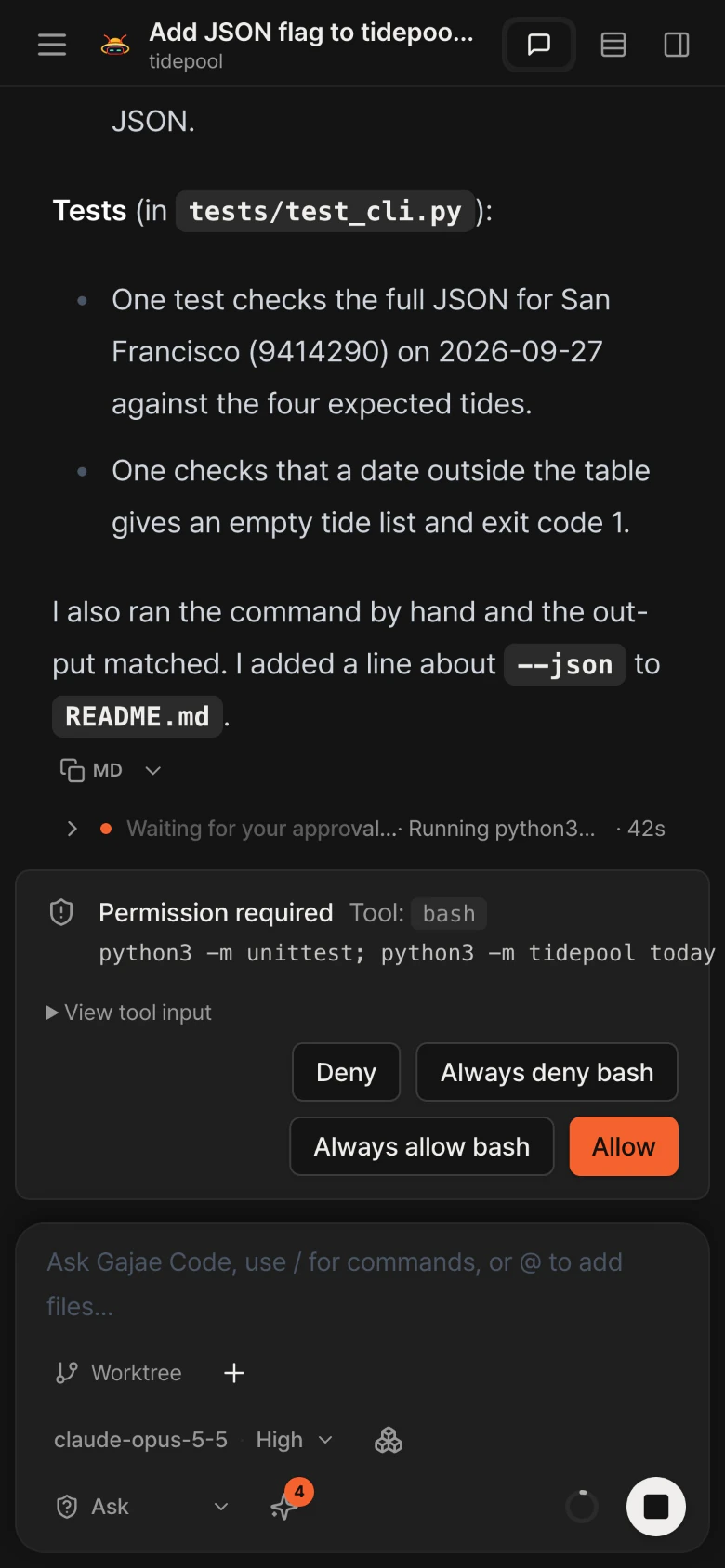
The web UI at phone width, in a real session recorded in v2.0.0-beta.20.
Notarized by AppleSigned with a Developer ID
MIT LicenseOpen source on GitHub
Runs on your machineLoopback by default, fails closed
Gajae Code SDK 0.17.6Bundled, in an isolated worker
One real session
Every step of the turn, in plain view.
Every clip comes from the shipping app, following one real session in a small Python
project: a --json flag, a test run, a review and a follow-up.
01Live turn
Watch the work happen.
A turn’s reads, searches, edits and commands fold into one work block. While it runs, the row says what the agent is doing right now. When it finishes, one line sums up the turn.
Worked for 28s·5 files read·1 search·1 command·3 edits
The block never unfolds by itself, not even on failure. Its row carries the failed count.
02Permissions
Commands wait for you.
Put a project in Ask mode and every shell command stops the turn on a card. Allow it once, always allow it in this project, or deny it. The turn resumes where it paused.
Permission required·Tool: bash
A card answered in one window closes in every other.
03Review
Read the diff. Reply in the composer.
Every edit carries its diff inline in the conversation, with the line counts on its row. Read what changed, then write the next instruction in the composer. The agent takes it as the next turn of the same session.
edit / cli.py·+17 −0
04Session controls
Match the model to the task.
Pick the provider, the model and the reasoning depth from one searchable picker, without leaving the session. A model chosen for a session stays with it. Models, presets and credentials come from your own Gajae Code install.
Provider·Conversation model·Reasoning
05Isolation
Isolated by default.
In a git repository, each new session runs in its own managed worktree, so your checkout stays as you left it. The agent sidebar reports the changes, the directory and the branch. Going back to the shared checkout is one click, set per project.
Run location·Project · New worktree
A run that would rewrite git state outside its own worktree asks first.
06Sessions
Every session, at a glance.
Running, waiting for your input, finished or failed and not viewed yet: each session shows its state. The Work section gathers what needs a look across every project, and the model names each session from its first message.
Running·Waiting for your input
Web UI · self-hosted
Approve from your phone.
The web UI works down to phone width, on the same live run. Tap Allow on the phone
and the card closes in the desktop browser by itself; the turn carries on.
Not out of the box: the server listens on loopback and fails closed. A phone reaches
it only over a network path you set up to a server you run, such as a tailnet, a VPN
or an SSH tunnel. Web mode has one owner and no sign-in, so that network is the boundary.
Self-host guide
The film
One session, start to finish.
The same real session, cut together: picking a model, the live turn, the permission card, the diff, the reply and the phone. Silent, with on-screen titles.
Since v2.0.0-beta.7 the DMG is signed with a Developer ID and notarized by Apple, so
macOS opens it like any other app. Verify the download anyway; the checksum is
published beside it.
1
Download the DMG and its SHA-256 file.
2
Open the DMG and drag Gajae Code App to Applications.
3
Open the app. Gatekeeper checks the notarization ticket and lets it run.
4
Only a build older than beta.7 needs System Settings → Privacy & Security → Open Anyway.
Verify in Terminal
cd ~/Downloads
shasum -a 256 -c gajae-app-desktop-2.0.0-beta.20-macos-arm64.dmg.sha256
Yes. Gajae Code App is open source under the MIT license. It does not include a model or subscription.
Where does it run?
On your machine: the desktop app on a Mac, or the web UI on a Linux server you control. Project files and execution state stay on the host. Prompts and context go to the model provider you pick.
What does it support?
Gajae Code. The app uses the models, presets, skills, and credentials configured in your Gajae Code installation, and you can sign in to providers from inside the app.
Do I need the desktop app?
No. You can run the web UI from source or use the Linux server archive. See the install guide.
Can I use it from my phone?
Through the web UI, yes, once your phone can reach the server over a trusted network path you set up, such as a tailnet, a VPN or an SSH tunnel. The server listens on loopback by default, so this is never open out of the box. There is no native mobile app.
Is it multi-user?
No. Web mode has one owner and no sign-in: whoever reaches the server is the owner, so the network is the boundary.
Is there a Windows or Intel Mac build?
No. The desktop app is built for Apple Silicon Macs only, and Windows is not planned. On Linux, use the server archive and the web UI.
Signed. Notarized. Yours.
Run the agent. Watch the work. Keep everything on your machine.